HP OmniBook 5 Review: The Best Budget Laptop So Far?
November 20, 2026
|
The redesigned HP OmniBook 5 looks and feels more expensive than it is, but its display, trackpad, and speakers reveal some budget compromises.
Summary
The redesigned HP OmniBook 5 looks and feels far more premium than its price suggests.
Table of contents:
HP OmniBook 5 Review: The Best Budget Laptop So Far?Summary: A Budget Laptop That Feels PremiumDesign and Build Quality: It Looks FantasticKeyboard: Better Than You'd ExpectBattery Life: Excellent for the MoneyPerformance: More Than Enough for Everyday TasksDon't Confuse Core With Core UltraHeat and Fan Noise: Quiet and ComfortableOLED Display: Great Colors, Disappointing BrightnessPorts: Better Than the Neo, Not as Good as the XPSTrackpad and Speakers: Where HP Cut CostsLinux Support and UpgradeabilityBe Careful: There Are Multiple OmniBook 5 ModelsConclusion: Should You Buy the HP OmniBook 5?
HP OmniBook 5 Review: The Best Budget Laptop So Far?
Summary
The redesigned HP OmniBook 5 looks and feels considerably more premium than its price suggests. With a stylish lightweight chassis, comfortable keyboard, excellent battery life, and affordable pricing, it's one of the most compelling budget laptops we've tested. However, its dim display, mediocre trackpad, and limited graphics performance remind us that this is still a budget machine.
Summary: A Budget Laptop That Feels Premium
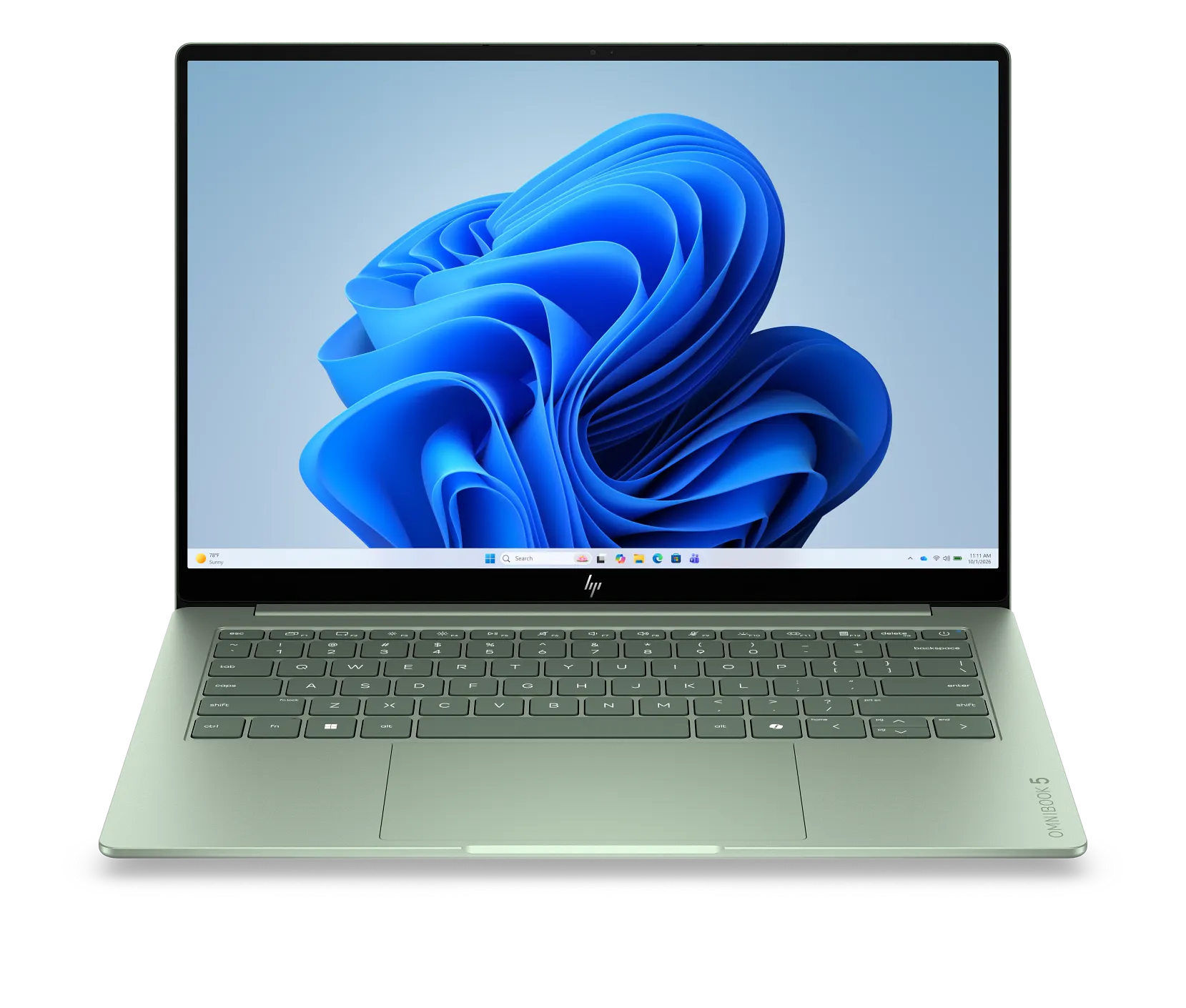
HP has just redesigned the OmniBook 5, and boy does it look good.
Starting at around $700, this laptop punches well above its price point. It looks and feels premium, has excellent battery life, and offers a comfortable backlit keyboard.
It also makes a compelling alternative to Apple's MacBook Neo. The OmniBook is lighter, lasts longer on battery, and can be configured with 16GB of memory instead of the Neo's fixed 8GB. CPU performance is more competitive than we initially thought, though, following our MacBook Neo retest.
In fact, this new OmniBook even gives Dell's XPS 13, our previous value-for-money favorite, a solid run for its money.
After testing it, Cierra said she'd choose the OmniBook. Personally, I'd still lean toward the XPS.
Here's where HP got it right, and where it cut corners.
Design and Build Quality: It Looks Fantastic
The most obvious win for the OmniBook 5 is its design.
HP has absolutely nailed the new look. The green finish, which it's calling Honeydew, combines beautifully with the laptop's contemporary styling and angular chassis.
We've seen manufacturers experiment with colorful laptops before, but they often end up looking cheap or unusual. This one doesn't.
Compared to the older OmniBook 5, the redesigned model looks considerably more modern. Even the updated HP logo makes a difference.
Dell's XPS 13 looks rather plain next to it, while Apple's MacBook Neo looks chunkier and more playful.
The OmniBook also feels remarkably premium. Its matte-textured finish feels great and does an excellent job of resisting fingerprints.
It's thinner and lighter than the previous generation, too.
Our unit weighs just 1,177 grams, compared to 1,232 grams for the MacBook Neo. The XPS 13 remains lighter at 1,054 grams, but it's also a smaller laptop.

At just 1,177 grams, the redesigned OmniBook 5 is lighter than the MacBook Neo, although Dell's smaller XPS 13 remains lighter still.
There is some chassis flex, particularly around the keyboard, so it isn't as rigid as the XPS or MacBook Neo. However, the overall build quality is still excellent for the money.
Keyboard: Better Than You'd Expect
The keyboard is another area where HP has done well.
There's more key travel than on the XPS 13, making it more comfortable to type on. Dell's keyboard feels comparatively shallow, almost as though your fingers are hitting the bottom of the chassis.
The OmniBook also has a backlit keyboard across all configurations, unlike the MacBook Neo.
Another sensible decision is the power button's placement at the top of the keyboard rather than on the side, where it could be accidentally pressed when picking up the laptop.
The downsides? It's not the quietest keyboard, and there's some deck flex when typing, giving it a slightly mushy feel.
Still, for a budget laptop, it's a solid keyboard.
Battery Life: Excellent for the Money
Battery life is one of the OmniBook's biggest strengths.
In our office productivity test, with the display set to 300 nits and Wi-Fi and Bluetooth enabled, it lasted 10 hours and 24 minutes.
That's only 56 minutes behind the XPS 13, which lasted 11 hours and 20 minutes.
Acer's Swift Air 14 performed even better at 14 hours and 20 minutes, although it has a larger battery.
Apple's MacBook Neo, meanwhile, lasted 7 hours and 43 minutes after our retest. That's a noticeable improvement over its original result of 6 hours and 18 minutes, but the OmniBook still lasts 2 hours and 41 minutes longer.

The OmniBook 5 lasts 10 hours and 24 minutes in our office battery test, beating the MacBook Neo's improved result by over two and a half hours.
Like many modern thin-and-light laptops, the OmniBook also maintains its CPU performance when unplugged.
And if you do run out of power, HP includes a remarkably compact 65W charger that supports fast charging.
For students or office workers spending long days away from a power outlet, this is a genuine advantage.
Performance: More Than Enough for Everyday Tasks
The OmniBook 5 uses Intel's Core 5 320 processor, part of its Wildcat Lake family.
These processors are designed for basic computing: web browsing, office applications, studying, and general productivity.
For those tasks, the laptop feels snappy.
In Geekbench 7, the OmniBook scored 7,357 points in multi-core performance, slightly ahead of the MacBook Neo's updated score of 6,963.
However, the Neo actually performs better in single-core tasks, scoring 2,856 compared to the OmniBook's 2,324.
So, the performance difference between these laptops is smaller than our original testing suggested.
Dell's XPS 13 delivers considerably more multi-core performance, scoring 10,883.

The OmniBook 5 slightly outperforms the MacBook Neo in Geekbench 7 multi-core testing, although Apple's laptop has the advantage in single-core performance.
One of the OmniBook's biggest advantages over the Neo is memory.
You can configure the HP with 16GB of RAM, whereas the Neo is limited to 8GB. That extra memory can make a real difference when multitasking and may help the laptop remain useful for longer.
There are also more powerful Qualcomm processors available in this price range, including the one in our OmniBook 3.
Those laptops can be great for basic productivity, although Windows on ARM still has compatibility limitations with certain applications and peripherals.
For students who aren't sure what software they'll need in the future, I'd generally favor Intel.
Don't Confuse Core With Core Ultra
One important distinction is that Intel's Core processors aren't the same as its more powerful Core Ultra chips.
Core Ultra models can include additional CPU performance cores and twice as many integrated GPU cores.
That difference is particularly noticeable in gaming.
In 3DMark Steel Nomad Light, the OmniBook 5 scored just 1,112 points, compared to 2,179 for the XPS 13 and 1,702 for the MacBook Neo.

The OmniBook 5's integrated graphics fall behind the MacBook Neo and XPS 13, making it poorly suited to demanding games.
So, while the HP performs well enough for everyday computing, it's not suitable for demanding games.
If gaming is important to you, we'd recommend something with dedicated graphics, such as the Acer Nitro V 15.
Heat and Fan Noise: Quiet and Comfortable
One benefit of using a low-powered processor is that the OmniBook stays remarkably quiet during everyday tasks.
In regular use, we never heard the fans, and the laptop remained comfortably cool.
Even during our demanding Cinebench test, we measured a maximum keyboard temperature of just 37°C, with the underside reaching 44°C.

The OmniBook 5 stays comfortable under heavy CPU load, with a maximum keyboard temperature of just 37°C.
That means the keyboard and palm-rest area stay comfortable, although the underside can become noticeably warmer during intensive tasks.
Fan noise is also well controlled.
Under maximum CPU load, the OmniBook produced just 43 decibels, making it one of the quieter Windows laptops in our comparison.

At just 43 decibels under maximum CPU load, the OmniBook 5 is one of the quietest Windows laptops in our comparison.
For students working in libraries or shared spaces, that's a genuine benefit.
OLED Display: Great Colors, Disappointing Brightness
The OmniBook 5's display is a mixed bag.
On the positive side, it's an OLED touchscreen, which is unusual at this price point. Colors look vibrant and accurate, and you get the deep blacks that make OLED displays so appealing.
Unfortunately, it doesn't get particularly bright.
We measured a maximum of just 308 nits, compared to 495 nits for the XPS 13 and 542 nits for the MacBook Neo.

The OmniBook's OLED display reaches just 308 nits, considerably behind the brighter screens on the XPS 13 and MacBook Neo.
The display is also quite glossy, so reflections can become distracting in brighter environments.
Its 1920x1200 resolution is another compromise.
That's usable on a 14-inch laptop, but both the XPS 13 and MacBook Neo have higher-resolution displays, making text and other fine details look sharper.
The XPS also supports a smoother 120Hz refresh rate, whereas the OmniBook is limited to 60Hz.
Dell's screen has another advantage: its matte-like coating does an excellent job of reducing reflections, although it can make content look slightly grainy.
Overall, the HP's OLED looks lovely indoors, but I'd take the XPS's brighter, sharper display any day.
HP is also expected to offer an improved OLED option with higher resolution and brightness in the future, although its pricing and availability haven't been established.
Ports: Better Than the Neo, Not as Good as the XPS
The OmniBook has a reasonable selection of ports for a thin-and-light laptop.
You get two USB-C ports supporting charging and 10Gbps data transfers, alongside HDMI for connecting an external display.
That's certainly more versatile than the MacBook Neo's limited connectivity.
However, Dell's XPS 13 has two faster Thunderbolt 4 ports supporting up to 40Gbps transfers.
It also places one USB-C port on each side, which is more convenient when charging or docking.
We're also disappointed that HP removed the USB-A ports from this redesigned OmniBook. Keeping even one would have made connecting older accessories easier.
Still, the available connectivity should be sufficient for most budget buyers.
Trackpad and Speakers: Where HP Cut Costs
Unfortunately, the trackpad reminds you that this is still a budget laptop.
It's mechanical, with a slightly resistant surface that doesn't feel particularly smooth. Tracking also becomes less accurate when pressing near the bottom corners, and the click is a little loud.
Most of the OmniBook feels like something considerably more expensive. The trackpad doesn't.
The speakers are another compromise.
There's practically no bass, and they don't get particularly loud.
However, they're competitive with what we'd expect at this price point. They simply don't offer the richer audio experience available on more premium laptops.
Linux Support and Upgradeability
There is some good news for anyone interested in Linux.
We performed a full Ubuntu installation and updated the operating system. Everything we tested worked, including the webcam, display brightness controls, volume controls, keyboard, trackpad, Wi-Fi, and Bluetooth.
That's an excellent result for anyone who wants an affordable Linux laptop.
The OmniBook also offers some useful repairability.
Its SSD, battery, and Wi-Fi card are replaceable. The storage is a full-size NVMe SSD, while the wireless card supports Intel Wi-Fi 6E.
These are welcome features in a budget laptop, particularly if you're planning to keep it for several years.
Be Careful: There Are Multiple OmniBook 5 Models
Before buying, there's one very important thing to understand.
HP has released several completely different laptops under the OmniBook 5 name, and they're easy to confuse.
We've reviewed three versions over roughly the past year.
There's the considerably heavier 2025 model, a lighter version from earlier in 2026, and now this redesigned OmniBook 5 with its thinner chassis, updated appearance, and revised ports.
They're not the same laptop.
Unfortunately, HP's product naming and website don't make these differences particularly clear.
That's why we've separated the different OmniBook models here on bestlaptop.deals, so you can identify the specific configuration you're interested in.
Make sure you're buying the redesigned Core 5 320 model discussed here rather than one of the older versions.
Conclusion: Should You Buy the HP OmniBook 5?
Overall, this is one of the most impressive budget laptops we've tested.
It looks fantastic, feels far more premium than its price suggests, has a comfortable keyboard, excellent battery life, and enough performance for everyday tasks.
But there are compromises.
The OLED display isn't particularly bright or sharp, the trackpad feels cheap, and the speakers are underwhelming compared to premium alternatives.
So, would we actually buy it?
Cierra says yes. After using the OmniBook, XPS 13, Swift Air, and MacBook Neo, she'd choose the HP.
She prefers its keyboard over the XPS, likes its more premium feel compared to the Swift Air, and doesn't mind the lower-resolution display.
Personally, I'm torn between the OmniBook 5 and XPS 13.
The HP looks better and has a more comfortable keyboard, but Dell offers a brighter, sharper display in a smaller and lighter chassis.
I'd give the XPS a slight edge, although there's a strong argument for choosing the OmniBook, especially if it goes on sale.
And that's really the key.
While the OmniBook starts around $700, HP laptops frequently receive substantial discounts. If this model regularly drops to around $500 to $700, it could be an exceptional deal.