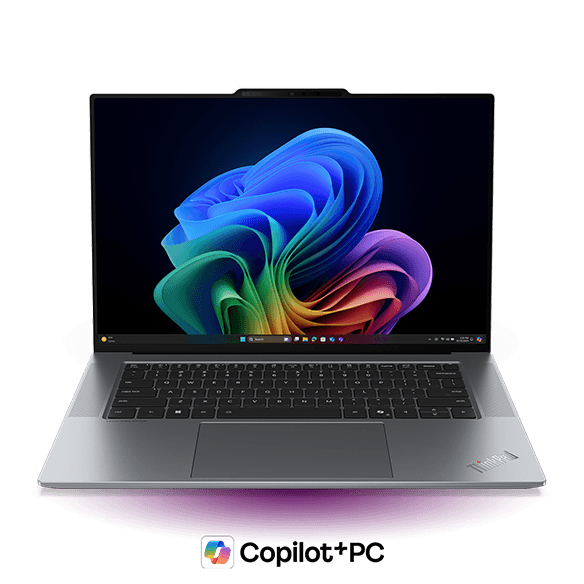
The ThinkPad X9 15p is one of the best thin-and-light Windows laptops we have tested.
It feels premium, has a fantastic 15.3-inch OLED display, excellent ports, strong battery life, and enough performance for demanding productivity work and light gaming. Lenovo has also managed to cool its powerful Intel processor without making the chassis uncomfortably hot or excessively loud.
The main downside is price. The X9 15p costs enough to compete with more powerful laptops, including the MacBook Pro 14 with an M5 Pro processor and Windows machines with dedicated graphics.
However, for someone who wants a large screen, strong everyday performance, and excellent portability in one premium Windows laptop, the ThinkPad X9 15p is difficult to beat.
What Is the ThinkPad X9 15p?
The ThinkPad X9 series is Lenovo’s modern interpretation of its business laptops. It replaces traditional features such as the red TrackPoint with a sleeker design, haptic trackpad, and OLED display.
The standard ThinkPad X9 15 was already a strong thin-and-light laptop. The new 15p is its performance-focused counterpart, adding Intel Core Ultra Series 3 processors, a larger cooling system, another Thunderbolt port, a full-sized SD card reader, and updated speakers.
There is currently no equivalent 14-inch version.
Which Configuration Should You Buy?
The ThinkPad X9 15p appears to offer two main processors: the Intel Core Ultra 5 338H and a higher-end Core Ultra X7.
The 338H is unusual. H-series chips normally combine strong CPU performance with weaker integrated graphics, but this model includes Intel’s B370 GPU.
Compared with the X7, it has:
- 12 CPU cores instead of 16
- 10 GPU cores instead of 12
That is a relatively small reduction if the Ultra 5 configuration is meaningfully cheaper. The X7 is faster, but the Core Ultra 5 338H may be the better-value choice for most buyers.
Our ThinkPad X9 15p came with the Core Ultra X7 processor, and it performed near the upper end of what we have seen from this chip.

Common Performance Tasks - Geekbench 6, Highest Performance Modes
In Geekbench, the X9 15p was substantially faster than the standard non-P ThinkPad X9 15. Its multi-core performance was similar to the MacBook Air, although Apple’s M5 processors remained clearly ahead in single-core performance.

Max CPU Performance - Cinebench 2026 Single Run with The Highest Performance Modes
In Cinebench, the ThinkPad’s multi-core score exceeded both the M5 MacBook Air and the base M5 MacBook Pro 14. It also substantially outperformed the HP OmniBook Ultra, despite the HP using a supposedly higher-end Intel X9 processor.

The ThinkPad X9 15p can briefly push its processor to around 65 watts and sustain approximately 50 watts.
The difference comes down to power. The ThinkPad can briefly push its CPU to around 65 watts and sustain approximately 50 watts, roughly twice the power available in the OmniBook Ultra and standard ThinkPad X9 15.
This demonstrates why a processor’s name alone does not determine performance. Cooling and sustained power limits can matter just as much as the chip itself.
Apple and Qualcomm remain more efficient, but Qualcomm laptops still have compromises in application compatibility and graphics support.
Excellent Cooling for a Thin Laptop
Powerful processors can be difficult to cool in a thin chassis, but Lenovo’s larger cooling system works well.
CPU Core Temperatures during a Cinebench 2026 run on Highest Mode
During a sustained CPU workload, internal temperatures peaked at around 96°C and averaged approximately 82°C.
More importantly, the keyboard deck and underside reached only around 40°C under maximum load. That is noticeably cooler than the MacBook Pro and HP OmniBook Ultra in similar tests.
Going from highest performance mode to balanced decreased the power draw quite a lot with a modest decrease in fan noise.
Fan noise was reasonable too. Balanced mode reduced average processor power from around 50 watts to 35 watts with a modest decrease in heat and fan noise. Best Power Efficiency lowered power to roughly 15 watts.
During office work and web browsing, the laptop remained cool, responsive, and effectively silent.
Impressive Integrated Graphics
The Intel B390 integrated GPU is one of the ThinkPad X9 15p’s standout features.

TimeSpy on Highest Performance Modes gives us a benchmarking score for both the GPU and CPU
In Time Spy, the only laptop in our comparison that performed better was the Legion 7a with dedicated Nvidia graphics. Older and less demanding games should run well at high settings, while newer titles will require reduced settings or resolution.

3DMark - Steel Nomad Light on Highest Performance Modes, a benchmarking tool for graphics performance.
In Steel Nomad Light, the B390 remained ahead of Qualcomm’s integrated graphics and Apple’s standard M5 10-core GPU.
It did not approach the performance of Apple’s M5 Pro GPU or a modern dedicated Nvidia GPU, but it remains one of the strongest integrated graphics options in a conventional thin-and-light Windows laptop.

CyberPunk 2077 1920x1200 on High Settings with Upscaling: Quality & Frame Gen Off
In Cyberpunk 2077, it averaged approximately 80 frames per second at High settings. That represents a substantial improvement over the standard ThinkPad X9 15.

Forza Horizon 6 1920x1200 on High Settings: TAA On, Upscaling & Frame Gen Off
Forza Horizon 6 was also playable at 1920 x 1200 using High settings. Lowering the quality settings would provide higher frame rates.
The X9 15p is suitable for casual gaming, but anyone buying primarily for games should still choose a laptop with dedicated graphics.
Creative Work
Creative performance follows a similar pattern. The ThinkPad is capable of photo editing and lighter projects, but it is not the best choice for serious video production or 3D rendering.
To get a smooth video playback we had to reduce the output resolution to half or lower. The same applied to 3D rendering. The X9 15p can complete the work, but buyers who regularly use GPU-accelerated creative applications should choose a MacBook Pro or a Windows laptop with dedicated graphics.
Excellent Battery Life

Battery Rundown Test - Office Tasks
The ThinkPad X9 15p lasted approximately 12.5 hours in our test. Its large 88Wh battery and efficient Intel processor both contribute to that strong result.
It also retains most of its CPU performance when unplugged, making it a good option for buyers who need to work away from a power outlet without sacrificing responsiveness.
Premium Build and Portable Design
The ThinkPad X9 15p is not the most visually distinctive laptop, but it feels premium. Its larger cooling section makes it slightly thicker and heavier than the standard X9 15. Even so, it remains impressively portable for a laptop with a 15.3-inch display and weighs around the same as a 15-inch MacBook Air.
Build quality is excellent, with very little flex in the keyboard deck or lid. The display can also be opened with one hand.
One of the Best Port Selections in Its Class
The ThinkPad X9 15p has one of the best port selections available on a thin-and-light laptop.
On the left, it includes HDMI 2.1, two Thunderbolt 4 ports, and a headphone and microphone jack. On the right, there is a USB-A port, a third Thunderbolt 4 port, and a full-sized UHS-I SD card reader.
The laptop can charge or connect to a dock through Thunderbolt on either side.
A Superb 15.3-Inch OLED Display
Its 15.3-inch OLED display is another major strength. The sharp 2880 x 1800 resolution makes it excellent for spreadsheets, programming, and other productivity work involving small text.
Touch and non-touch versions are available. Our touchscreen model felt responsive, and the screen-door effect sometimes caused by touch layers was minimal. We detected PWM flickering at lower brightness levels, although it did not bother us during real-world use.
Overall, this is one of the best displays available on a productivity laptop.
The Keyboard Is Only Average
The keyboard is one of the few mediocre parts of an otherwise excellent laptop, which is disappointing for a ThinkPad.
It uses a conventional layout, and the backlight does not bleed excessively around the keys. However, despite offering 1.35mm of travel, the keys feel relatively shallow. Lenovo’s Yoga keyboards provide a more satisfying click.
The ThinkPad keyboard is at least very quiet, making it well suited to meetings, classrooms, and shared workspaces.
Good Haptic Trackpad With Reliable Palm Rejection
The haptic trackpad is accurate and responsive, though it does not feel as natural as a MacBook trackpad. Its surface feels slightly too slippery, and adjusting the settings did not fully resolve that impression.
However, palm rejection is much better than on many Windows laptops with large haptic trackpads. We did not experience the constant cursor movement or accidental clicks that can make other models frustrating to use.
Lenovo appears to disable the trackpad temporarily when it has not detected movement. On a few occasions, it did not wake quickly enough and failed to register the beginning of a gesture.
That is a minor issue compared with the severe palm-rejection problems found on some competing Windows laptops.
Strong Speakers
They are clear, provide good stereo separation, and create an immersive soundstage for music and video. The visible front speakers suggest a major re-design, and the sound was somewhat improved over the ThinkPad X9 15. It is still above average for a Windows Laptop.
Limited Upgradeability
Internal upgradeability is limited.
The SSD and battery can be replaced, but the memory and Wi-Fi module are soldered.
The Wi-Fi 7 module supports the full standard, including 320MHz channels, as well as Bluetooth 6.
Buyers should therefore choose the amount of memory they expect to need for the laptop’s lifetime.
Linux Support
We tested Ubuntu 26.04 by booting from a USB drive.
The keyboard, trackpad, backlight, speakers, Bluetooth, Wi-Fi, brightness controls, and microphone all worked.
The only component we could not get working was the camera. A full installation and subsequent updates may resolve the issue, but we were unable to confirm that during testing.
Conclusion
The ThinkPad X9 15p is a phenomenal thin-and-light laptop. It combines strong performance, a large and excellent display, impressive cooling, good battery life, premium build quality, and one extremely good port selection.
Anyone considering the 15p should also look closely at the Core Ultra 5 338H configuration as it is the sweet spot if you are looking to the get the most for your money.
Another alternative worth considering is the MacBook Pro 14 with an M5 Pro processor. It delivers substantially more performance for video editing and other demanding creative workloads at a similar price.
The Lenovo IdeaPad Pro 5 is also a strong alternative. It feels slightly less premium but can include dedicated graphics in a similarly portable form factor. Availability, however, can be limited.
The ThinkPad X9 15p is best for someone who wants a large screen, strong enough performance, excellent portability, and a dependable premium Windows experience.